


SuperLive- Live Stream & Chat
4.55.69K Reviews
App Specs
- Version
- 2.44.0
- Updated On
- License
- Free
- Downloads
- 10,000,000+
- Developer
- Superlive Tech
- Categories
- Social
- Platform
- Android, iOS
Screenshots



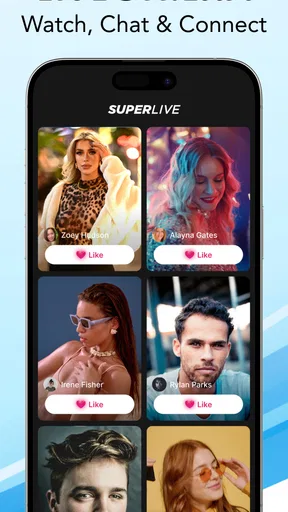
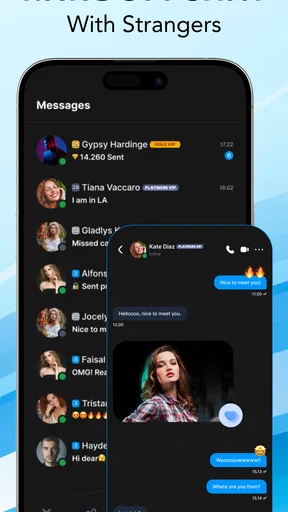

 Analysis by AppCompare
I approached SuperLive- Live Stream & Chat as someone looking for a social app built around live video rather than a polished, passive feed. My first impression was that its appeal depends less on simply watching a broadcast and more on joining the rhythm of a live room: arriving at the right moment, following the conversation, and deciding whether to participate or quietly observe. That makes it more immediate than an ordinary social network, but also less predictable.
Developed by Superlive Tech, this free social app is aimed at adults and carries a Mature 17+ content rating. It has grown into a large community, with a 4.5 average from around 242 thousand ratings and over 10 million installs. Those figures suggest that finding active rooms is not the main challenge. The real question is whether you enjoy the fast, sometimes noisy nature of live-streaming communities.
Where the experience usually gets stuck
The first friction point is expectation. Someone coming from a conventional social app may expect to open a feed, skim posts, and return later without missing anything important. Live video works differently. A room can feel welcoming one minute and confusing the next because the conversation has already moved on. If you join without understanding the room’s topic or social tone, the app can seem disorganized even when it is working normally.
I found that the best way to judge a live room is to watch for a short while before typing. The host’s style becomes clearer, the chat pace settles, and you can see whether the room is conversational, performance-focused, or mainly designed for casual viewing. This small pause is more useful than immediately trying to interact. It also helps avoid spending attention on a stream that simply is not suited to you.
Another common sticking point is the difference between watching and participating. Live chat moves quickly, so a message may receive little attention even when it is perfectly reasonable. That is not necessarily a technical failure or a sign that the community is unfriendly. In a busy room, timing matters. Short, relevant comments tend to work better than long explanations, particularly when several people are already writing at once.
Notifications can create a different kind of pressure. If you follow live activity closely, alerts may pull you back repeatedly. If you disable too much, you may miss the creators or rooms that made the app worthwhile. I recommend treating notifications as a selective tool rather than an all-or-nothing choice. Keep the signals that help you return to conversations you genuinely enjoy, and remove anything that makes the app feel like an obligation.
There is also a financial boundary to understand before becoming deeply involved. The app is free to install, but in-app purchases range from $0.99 to $399.99 per item. That does not mean every user needs to spend money, but it does mean the social atmosphere may include optional paid interactions or digital support. I would decide on a personal limit before browsing regularly, especially if the excitement of a live room makes quick decisions tempting.
Worth Reading Before You Choose

Flipboard Shows What News Apps Must Do Beyond the Feed

Switching to Android Auto Means Rethinking Your Driving Routine

Google Calendar Makes a Crowded Week Easier to Manage

Ludo King Makes the Most of the Minutes Between Plans

Baby Panda World Brings Quick Play to Modern Phones, but Its Game Library Feels Busy

ESPN’s Live Game View Makes Following Close Games Easier
My most important early tip is to separate entertainment from spending. You can evaluate the quality of the conversations, hosts, and community without buying anything. If a room is only enjoyable when you pay to be noticed or involved, that is useful information about the room, not a reason to keep spending.
What to check before blaming the app
When a stream refuses to load, chat appears delayed, or the screen behaves inconsistently, I start with simple checks rather than assuming the service is broken. Switching between a reliable Wi-Fi connection and mobile data can reveal whether the problem is local connectivity. A weak or crowded connection may allow ordinary browsing while struggling with continuous live video, which makes the issue easy to misread.
I also check whether other internet-heavy services are behaving normally on the same device. If video calls, music streaming, or ordinary websites are also slow, the broader connection is the more likely explanation. Closing unused apps can help when the phone is short on available resources, particularly if several demanding services have been open for a long time.
The device requirement is worth noting before installation. The current version is 2.39.1 and supports Android 8.0 or later. If you are using an older Android phone, compatibility is not something to work around through repeated installation attempts. A device that technically opens the app may still struggle with live video if its hardware, storage, or battery condition is poor.
Storage is another practical check. Live-streaming apps may need room for temporary files, updates, and normal operating-system activity. I would leave comfortable free space rather than trying to run the app on a nearly full phone. This is especially relevant when the app opens but crashes during longer sessions, since limited storage can affect more than the initial launch.
Battery condition matters as well. Watching live video with the screen active for a long period is naturally more demanding than reading a text feed. If the phone becomes hot or loses charge quickly, I would first reduce the session length, close background activity, and avoid using the app in direct heat. A warm device can make performance feel worse, even when the stream itself is available.
For account and access problems, I would carefully review the sign-in details, confirm that the phone’s date and time are set correctly, and restart the app after a failed attempt rather than repeatedly tapping the same control. These are basic steps, but they prevent a temporary session error from turning into a confusing loop. I would also avoid installing unofficial versions, because they can create problems that are impossible to separate from the official app’s behavior.
A setup routine that saves time
My preferred setup is deliberately modest. I install the app from the normal platform store, make sure the operating system is supported, and begin by browsing instead of immediately trying to build a public presence. That gives me a chance to understand the pace of the rooms and decide what kind of participation feels comfortable.
Next, I spend a few minutes checking the app’s available controls and the phone’s notification settings. I do not want every possible alert enabled on the first day. A quieter setup makes it easier to judge the app on its actual content instead of on the constant interruption of notifications.
I also test the experience on the connection I expect to use most often. If I plan to watch while commuting, I test mobile data in a normal location rather than judging performance only on home Wi-Fi. If I mainly use it at home, I check the distance from the router and whether other people are using the same connection. Live video is sensitive to conditions that ordinary social browsing can hide.
Privacy and comfort should be part of setup, even for viewers. I would avoid sharing personal details in a fast-moving room, and I would leave a conversation that becomes aggressive, uncomfortable, or inappropriate. The Mature 17+ rating is a clear reminder that this is not an app I would hand to a child or treat as a universally family-friendly space.
For creators or people considering live participation, preparation is more important than expensive equipment. A stable connection, a quiet setting, and a clear idea of what you want to discuss will usually matter more than trying to make the first session elaborate. I would begin with a short test, learn how the room responds, and only then decide whether regular streaming is worth the effort.
Recovering when a session goes wrong
When a stream freezes, I avoid immediately reinstalling the app. First I wait briefly, check whether chat is also stalled, and try leaving and re-entering the room. If only one stream is affected while other areas work, the problem may be tied to that particular session rather than the entire application. This distinction prevents unnecessary changes to an otherwise usable setup.
If the app becomes unresponsive, I close it fully and reopen it. A phone restart is reasonable when several apps are misbehaving, but it should not be the first response to every small delay. I prefer changing one thing at a time so I can tell whether the connection, the room, or the device caused the recovery.
For persistent trouble, I would check for an available app update and confirm that the phone still has adequate storage. Updates can affect compatibility, while a nearly full device can make normal app behavior unreliable. If the issue continues only on one network, testing another connection provides a useful clue before contacting support or making more drastic changes.
Chat recovery needs a slightly different approach. If messages appear late, I would not send the same comment repeatedly. Live systems can catch up suddenly, turning one message into several duplicates. Waiting, leaving the room, and returning is cleaner. If the conversation has moved on, I would accept that the moment has passed rather than trying to recreate it through repeated posts.
Paid activity deserves extra caution during recovery. If a purchase or digital interaction seems delayed, I would not immediately repeat the action. I would first check whether the original result appears after reopening the relevant screen and review the platform’s transaction history before trying again. This is one of the most practical habits for any app with optional purchases, particularly when individual items can cost as much as $399.99.
One less obvious workflow is to keep notes outside the app when you discover rooms or hosts you genuinely want to revisit. Live content is easy to lose in the moment, and relying entirely on memory can make the service feel more random than it is. A simple private note about what you liked and when you found it can help you build a more intentional routine without turning the app into a full-time commitment.
When the app is not the right choice
This app is a good fit for someone who enjoys real-time social contact, spontaneous conversations, and the feeling that something is happening now. It can work well during a short break when you want interaction rather than a silent video library. I can also see its value for people who like discovering personalities through unscripted moments instead of relying on edited posts.
A realistic everyday use case would be an evening when I have fifteen minutes before dinner. I open the app, browse a few rooms, watch long enough to understand the tone, and join one conversation that feels relaxed. If the room becomes too fast or distracting, I leave without feeling that I have failed to use the app correctly. That flexibility is important: SuperLive works best as an optional social window, not as a schedule I must maintain.
I would be more cautious recommending it to someone who wants carefully organized educational material, dependable playback on demand, or a quiet feed that can be consumed at any pace. A video platform built around recorded content is usually better for tutorials and planned viewing. A messaging app is better when the goal is a private, predictable conversation with people you already know. A traditional social network may be preferable if you want posts that remain easy to revisit.
People who dislike public attention should also consider the trade-off. Even if you only watch, the atmosphere can encourage participation, and the boundaries between audience and community may feel less clear than in a standard feed. Likewise, anyone trying to reduce screen time may find live rooms unusually sticky because there is always the possibility that something new is about to happen.
The age rating should be taken seriously. I would not recommend treating the app as suitable for younger users simply because some rooms may appear harmless. Adults should still use judgment about what they watch, what they share, and how quickly they respond to strangers. The live format reduces the distance between seeing and reacting, so a pause before posting is genuinely useful.
My practical verdict after using it
SuperLive is most convincing when I use it as a place for brief, spontaneous connection rather than as a replacement for every other social tool. Its large audience gives the service a sense of activity, while the live format creates a kind of immediacy that recorded video and ordinary feeds cannot reproduce. The downside is that the same immediacy brings noise, uneven room quality, technical sensitivity, and the possibility of impulsive spending.
I would recommend starting slowly: browse first, test the app on your normal connection, control notifications, and decide on a spending boundary before paid interactions become part of your routine. If a room feels confusing, give it a moment instead of judging it from the first few seconds. If a stream fails, separate network and device checks from app-specific troubleshooting.
The app is free, but the experience is not cost-free in terms of attention. That is the central trade-off I would explain to a friend. You may find lively conversations and memorable moments, but you need to choose your rooms carefully and protect your time. With that mindset, the current version offers a practical entry into live social video for adults on supported devices.
My final recommendation is therefore selective rather than automatic. Try it if you want live interaction and are comfortable with an unpredictable social environment. Skip it if you need calm, private messaging, structured content, or firm control over every minute of your media use. For the right viewer, SuperLive- Live Stream & Chat can feel immediate and engaging; for everyone else, its constant movement may feel more tiring than social.
Pros
- Supports live video broadcasting and real-time viewer interaction.
- Chat features make it easy to connect with streamers and other users.
- Offers a wide variety of live content across different interests.
- Users can discover new broadcasts through an active streaming community.
- Available on mobile devices for convenient viewing and chatting on the go.
Cons
- Content quality can vary considerably between different live channels.
- Live chats may include spam or inappropriate comments.
- Some features or interactions may require in-app purchases.
- Watching streams can consume significant mobile data and battery life.
- Privacy settings should be checked carefully before broadcasting publicly.
FAQs for SuperLive- Live Stream & Chat
What is SuperLive – Live Stream & Chat?
SuperLive – Live Stream & Chat is a social streaming app where users can watch live broadcasts, interact with streamers, send messages, and discover entertainment content in real time. Depending on the region and available features, users may also be able to start their own live streams, build a following, receive virtual gifts, and participate in private or group conversations.
Is SuperLive – Live Stream & Chat free to download and use?
The app can generally be downloaded for free on supported Android or iOS devices, and many basic features are available without payment. However, SuperLive may include optional in-app purchases, such as virtual coins, gifts, premium interactions, or other digital items. Before making a purchase, check the current pricing, payment method, and subscription details shown in your app store.
Do I need to create an account to watch live streams?
Some content may be accessible immediately after installing the application, but creating an account is usually necessary for a complete experience. Registration can allow you to follow streamers, send comments, use chat functions, personalize recommendations, and participate in interactive features. The app may request basic profile information, and available sign-in options can vary by device, country, and current version.
Is SuperLive safe for children and teenagers?
SuperLive is designed around live, user-generated content, so broadcasts and conversations may change quickly and may not always be suitable for younger users. Parents should review the app’s age rating, privacy settings, chat controls, and purchase options before allowing access. It is also advisable to supervise usage, avoid sharing personal information, and report suspicious, offensive, or inappropriate behavior through the available tools.
What permissions and internet connection does SuperLive require?
Because SuperLive focuses on live video and communication, it normally requires a stable internet connection, preferably Wi-Fi or a reliable mobile data network. If you stream yourself, the app may request access to the camera and microphone; notifications and storage-related permissions may also be offered. Review each permission carefully and enable only what you are comfortable using through your device settings.


